Imagine coming home to perfectly clean floors every single day, without lifting a finger. That’s the dream, right? But the real magic behind a truly autonomous cleaning experience isn’t just suction power; it’s intelligence. A key part of that intelligence is understanding How To Map Rooms With Robot Vacuum technology, turning a random, bumbling puck into a strategic cleaning mastermind. This guide will walk you through everything, from the fascinating tech behind the scenes to the practical steps for creating a perfect digital blueprint of your home.
Think of it this way: a robot vacuum without a map is like a tourist without a GPS—it’ll eventually get somewhere, but it’s going to be inefficient, miss spots, and probably bump into the same table leg five times. A mapped home, on the other hand, is a clean home.
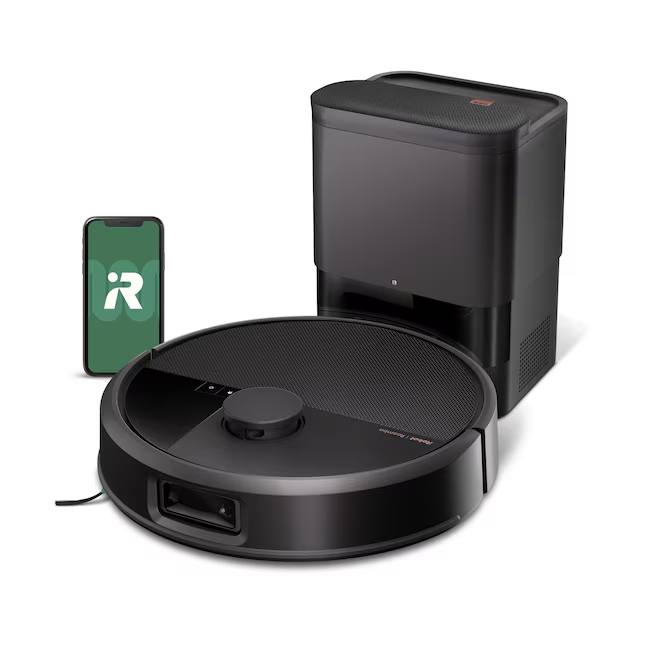
How Do Robot Vacuums Actually See Your Home?
Ever wondered how this little disc can navigate the complex maze of your furniture? It’s not magic, it’s a brilliant combination of advanced sensors and smart software. The two leading technologies are LiDAR and vSLAM.
The Magic of LiDAR: A 360-Degree Laser Show
LiDAR, which stands for Light Detection and Ranging, is the gold standard for robotic mapping. A rapidly spinning turret on top of the robot shoots out a harmless, invisible laser, measuring the time it takes for the light to bounce off objects and return.
- How it works: By taking thousands of these measurements per second, it creates an incredibly precise, 360-degree map of your room in real-time. It’s like having a tiny, super-fast cartographer building a blueprint of your home.
- Key Advantage: It’s exceptionally accurate and works flawlessly in complete darkness. So, if you want your robot to clean while you’re asleep, LiDAR is your best friend.
- The Downside: The spinning turret adds a bit of height to the robot, which might prevent it from getting under some low-profile furniture.
The vSLAM Alternative: Seeing Through a Camera’s Eye
vSLAM, or Visual Simultaneous Localization and Mapping, uses a camera as its primary “eye.” It captures images of your home and identifies unique landmarks—like the corner of a bookshelf, a picture frame, or a distinct chair leg—to figure out where it is and build a map as it goes.
- How it works: It’s similar to how we navigate a familiar room by recognizing objects. Advanced AI helps the robot distinguish between a table and a shadow.
- Key Advantage: Robots with vSLAM are often shorter, allowing them to slip under more furniture. Some can even use their cameras for AI-powered obstacle avoidance, actively identifying and steering clear of things like socks, shoes, or pet waste.
- The Downside: Because it relies on a camera, vSLAM needs adequate lighting to work effectively. It can struggle in dimly lit rooms or at night.
Expert Insight: “People often focus on the sensors, but the real star is the SLAM algorithm,” explains Dr. Alistair Finch, a robotics engineer. “It’s the ‘brain’ that pieces together all the data from LiDAR or a camera. A powerful SLAM algorithm means a more stable, accurate map that won’t get ‘confused’ if you move a chair.”
Your Step-by-Step Guide: How to Map Rooms with Robot Vacuum
So, you’ve unboxed your new cleaning companion. Now what? Creating that first, crucial map is easier than you think. Follow these steps to get a perfect layout from the get-go.
- Prep Your Home for Success: Before you start the first mapping run, do a quick tidy-up. This isn’t about cleaning—it’s about creating clear pathways.
- Pick up loose items like shoes, toys, and charging cables.
- Open all the doors to the rooms you want to be included in the map.
- Tuck chairs under tables to create a more defined space.
- Temporarily lift or secure any thin rugs with dark patterns, as these can sometimes confuse sensors.
- Initiate the Mapping Run: Place the robot on its charging dock. Open the companion app on your phone and look for an option like “Create Map,” “Smart Map,” or “Mapping Run.” Most modern robots have a dedicated mode for this where the vacuum motor is off, allowing the robot to focus solely on exploring and conserving battery. Let it run completely uninterrupted until it returns to its base.
- Review and Edit Your Smart Map: Once the robot has finished its tour, a digital map of your floor plan will appear in the app. Now comes the fun part! You can customize it:
- Divide Rooms: The robot might group your kitchen and dining area into one giant room. Use the “Divide” tool to draw a line separating them into distinct zones.
- Merge Spaces: Conversely, it might split a large living room into two. Use the “Merge” tool to combine them.
- Name Everything: Label each room (e.g., “Living Room,” “Kitchen,” “Master Bedroom”). This is essential for voice commands like, “Alexa, tell the robot to clean the kitchen.”
- Unleash the Power of Your Map: This is where the magic happens. Your map is now a powerful tool.
- Set No-Go Zones: Draw a box around the area with your pet’s food and water bowls, or the corner where your kids build their LEGO creations. The robot will treat this area like an invisible wall.
- Create Virtual Walls: Instead of a box, you can draw a simple line to block off an entire room or hallway without needing to close a physical door.
- Schedule Room-Specific Cleaning: Set up a schedule to clean the kitchen every night after dinner, the living room on Mondays and Fridays, and the bedrooms twice a week. This is true, customized automation. In my house, this feature was a total game-changer.
|
Our Picks for the Best Robot Vacuum in 2025
As an Amazon Associate, we earn from qualifying purchases.
|
||
| Num | Product | Action |
|---|---|---|
| 1 | MONSGA Robot Vacuum and Mop Combo, 5000Pa Robotic Vacuum with 3.5L Self Emptying Station, Lidar Navigation Robot Vacuum Cleaner, 180mins Runtime, APP/Remote/Voice Control, for Hard Floors and Carpets |

|
| 2 | Shark Robot Vacuum & Mop Combo, Powerful Suction, Matrix Plus, 60-Day Debris Capacity, HEPA Bagless Self Empty Base, Sonic Mopping, Home Mapping for Pet Hair - Carpets & Hardfloor, AV2610WA |
|
| 3 | ILIFE A30 Pro Robot Vacuum and Mop, Self Emptying Station for 60 Days, 5000Pa Suction, LiDAR Navigation, No-Go Zones, 2.4G WiFi/App/Alexa/Remote Control, Roller Brush for Carpet, Hard Floors, 110V |
|
| 4 | Shark Matrix Plus 2in1 Robot Vacuum & Mop with Sonic Mopping, Matrix Clean, Home Mapping, HEPA Bagless Self Empty Base, CleanEdge, for Pet Hair, WiFi, Compatible with Alexa, Black/Gold (AV2613WA) |
|
| 5 | Shark AV753 ION Robot Vacuum, Tri-Brush System, Wifi Connected, 120 Min Runtime, Works with Alexa, Multi Surface Cleaning, Grey |
|
| 6 | ILIFE V2 Robot Vacuum Cleaner, Tangle-Free Suction, 120 Mins Runtime, Slim, Self-Charging Robotic Vacuum Cleaner, Ideal for Pet Hair and Hard Floors |
|
| 7 | Shark AV2501S AI Ultra Robot Vacuum, with Matrix Clean, Home Mapping, 30-Day Capacity HEPA Bagless Self Empty Base, Perfect for Pet Hair, Wifi, Dark Grey |
|
| 8 | Shark AV2501S AI Ultra Robot Vacuum, with Matrix Clean, Home Mapping, 30-Day Capacity HEPA Bagless Self Empty Base, Perfect for Pet Hair, Wifi, Dark Grey |
|
| 9 | Tikom Robot Vacuum and Mop Combo, 5000Pa Robotic Vacuum Cleaner, 150 Min Max, App & Remote Control, Ideal for Hard Floor, Carpet, Pet Hair, Self-Charge(G8000 Max) |
|
| 10 | ILIFE V2 Robot Vacuum Cleaner, Tangle-Free Suction, 120 Mins Runtime, Slim, Self-Charging Robotic Vacuum Cleaner, Ideal for Pet Hair and Hard Floors |
|
What Happens When Mapping Goes Wrong? Troubleshooting Tips
Sometimes, the mapping process isn’t perfect. Don’t worry, most issues are easy to fix.
- The map is incomplete: This usually happens if a door was closed or the robot got stuck. Clear the obstruction and try sending the robot to clean the specific area it missed. Most apps have a feature to update the existing map.
- The robot gets “lost” or starts a new map: This can happen if the robot is picked up and moved mid-clean, or if significant changes are made to the room’s layout. Always start the robot from its charging dock, as this is its “home” reference point. If you’ve rearranged your entire living room, it might be best to delete the old map and run a fresh mapping run.
- The map won’t save: Ensure the robot successfully completes its run and returns to the dock. This is usually the final step that triggers the map-saving process. Also, check for a stable Wi-Fi connection.
Beyond the Basics: Advanced Mapping Features to Look For
As technology evolves, so do the mapping capabilities of robot vacuums. Here are a few advanced features that can take your cleaning experience to the next level.
Multi-Floor Mapping
If you live in a multi-story home, this is a non-negotiable feature. A robot with multi-floor mapping can save a separate map for each level of your house. Simply carry the robot to the new floor, and it will automatically recognize where it is and load the correct map.
3D Mapping and Obstacle Recognition
The newest, high-end models are taking mapping into the third dimension. They use advanced sensors and AI to not only map the floor plan but also identify and log the position of furniture in a 3D space. This often ties into AI-powered obstacle avoidance, where the robot can recognize and navigate around specific objects like power cords, socks, and even pet accidents in real-time.
Smart Home Integration
A well-mapped home allows for seamless integration with voice assistants like Amazon Alexa and Google Assistant. Once your rooms are named in the app, you can give specific commands like, “Hey Google, have the vacuum clean under the dining table,” and it will know exactly where to go.
Frequently Asked Questions
Can I map my house without Wi-Fi?
No. The robot vacuum needs a stable Wi-Fi connection to communicate with the app on your smartphone, which is where the map is generated, stored, and customized.
How long does it take for a robot vacuum to map a house?
This depends on the size and complexity of your home. An average-sized home (around 1,500 sq ft) typically takes between 45 to 90 minutes for an initial mapping run.
Do I need to remap if I move furniture?
Not for minor changes. If you move a coffee table or a chair, the robot will update the map on its next cleaning run. However, if you do a major furniture overhaul (like completely rearranging a room), it’s a good idea to delete the old map and create a new one for optimal navigation.
Can a robot vacuum map multiple floors?
Yes, many mid-range to high-end models offer multi-floor mapping. They can store two, three, or even more maps. Always check the product specifications to confirm this feature is included.
What is the best type of robot vacuum for mapping?
For the most accurate and reliable mapping, especially in varied lighting conditions, a robot vacuum with LiDAR navigation is generally considered the best choice. It creates precise maps quickly and isn’t dependent on ambient light.
Your Home, Your Rules
Mastering how to map rooms with a robot vacuum is the single most important step you can take to transform your device from a simple gadget into a truly intelligent cleaning partner. It’s the difference between a random cleaning pattern and a precise, efficient strategy tailored perfectly to your home and lifestyle. By taking the time to create and customize your smart map, you’re not just cleaning your floors—you’re reclaiming your time and making your home a smarter, more efficient place to live.